Payroll Processing Step 2: Express Post
This step describes how to enter or import your hours and payment for payroll processing. For more information about payroll processing, see Processing Payroll.
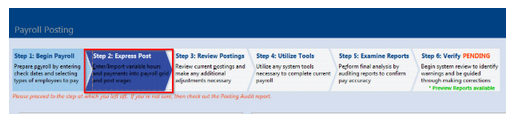
From the Payroll Posting page, click the Step 2: Express Post tab.
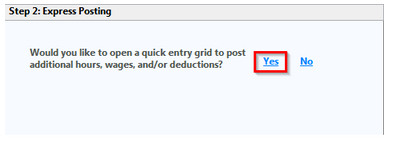
If you need to enter hours or amounts for the session, click Yes to open the Choose a Posting Session.
Note:
If no hours or amounts need to be entered, click No. Then skip to Step 3: Review Postings.
Selecting an Express Post Grid:
Perform the following steps to create a new posting session.
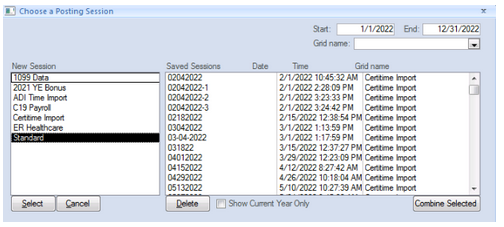
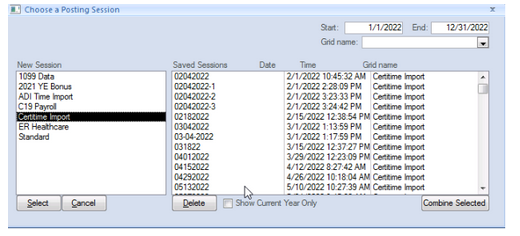
From the New Session section, select the appropriate posting session and click Select. The Session window is displayed.
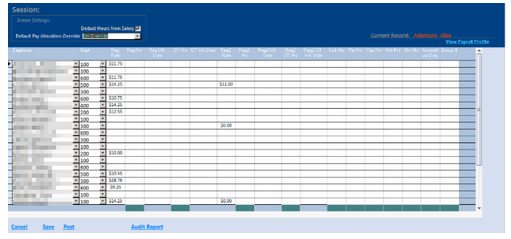
Enter hours into the Sessions table and confirm the total hours. Then do one of the following:
-
To complete the posting session, click Post.
-
To save the posting session to add additional details later, click Save.
A window displays asking you to save the session. Click Yes.
A second window displays where you enter the name for the posting. For example, a named saved session would be your pay date or period end date: 04.01.17 hours. Click OK.
The session is added to the Saved Sessions section.
Creating a grid to import time from TimeCo:
From the choosing a posting session, select CertiTime import
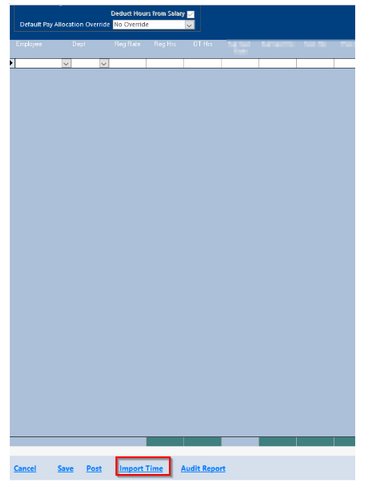
Once the next screen populates, you'll select "Import time"
On the following screen a button will appear that will state "Direct Import from CertiTime"
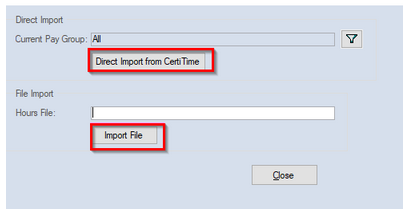
Hit "Close" and import can be seen by employee and earnings. Please make any necessary changes for this payroll.
To complete the posting session you can either Save or Post the session.
If you choose to save, you can come back later and edit or add additional items to that grid. If you choose to Post, you will post the time import grid into payroll and you can move on to step 3 of the payroll process or enter any additional grids.